Six steps to a successful ERP implementation
An enterprise resource planning or ERP implementation solution offers significant benefits, especially in today’s mobile-savvy marketplace & complex business processes. If your corporation needs a software suite to manage its financial, human resources, supply chain, and other business operations, a centralized and integrated comprehensive business management system like Microsoft Dynamics 365 Business Central may be the useful and advantageous choice to go to. Dynamics 365 ERP enables your organization to access a shared database on any device reliably and offers easy customization, reduced technical costs, and improved productivity. However, there are a few key phrases in the ERP adoption process, each with its own objectives. These phases could be distinct or overlap, depending on the specific requirements of the company. Successful ERP implementation & upgradation of new business processes Phases of an ERP implementation plan – A typical ERP implementation life cycle includes six stages starting from discovery and planning, design, development, testing, and deployment to support and updates. Phase 1: Discovery and planning ERP offers comprehensive solutions to a wide range of business problems. It’s important to determine the true reason for putting ERP into place for your company, though. Your ERP implementation partner assesses your existing systems and procedures to identify the requirements, project scope, milestones, and modifications required. Once your vision and requirements are identified, the implementation partner will prepare the project plan. Want information about our ERP solutions? Consult with our experts As per the study by Panorama, 61.1% of ERP implementations take longer than expected and 74.1% of ERP projects exceed the budget. Although the primary cause of delay and overbudgeting is unclear definitions of ERP implementation. The ERP features must be evaluated in accordance with the barometer of synchronization within the needs of the company. The ERP demand list should be created in accordance with the budget and fundamental requirements to ensure a seamless and obstacle-free ERP deployment. Phase 2: Design phase ERP deployment includes several goals, including improving financial control, supporting organic growth, mergers, and acquisitions, as well as other typical procedures. The team will work on the specific criteria here in order to create the precise design of the new ERP system that your business needs. This entails creating a new, more effective business procedure and workflow. Since they have the most detailed knowledge of the current business process, users must be involved in the design of the new workflow. Additionally, it will also ensure that they will accept and use the new ERP solution. Phase 3: Development The development teams put up the standard solution using agreed-upon configurations and customizations of the ERP solution to support the newly specified process after they had clear design requirements. ERP software is designed after a significant amount of research and according to the needs of the specific industry. In some cases, there may be no need for customization. Additionally, the development phase also entails creating integrations with other work management and business productivity tools that ERP systems won’t be able to replace. Phase 4: Testing Testing is an important phase of the implementation process, which takes care of system and user acceptance testing. In many cases, testing and development can occur concurrently. For instance, the team may test-specific modules and features while implementing fixes and adjustments based on test results or may test one module while the other is in development. Sometimes this phase also includes beta testing, where some employees test the system for their day-to-day activities. This process ensures the ERP solution meets the requirements and is ready for deployment. During the pilot testing, management must evaluate the realization of the value of the system against the desired value of the company. After the successful testing and ensuring the ERP readiness for deployment, data migration activity should be performed before go-live. Under this process, the data from the old system is mapped to the new ERP. To ensure a smooth transition and future use of the software, only the most essential data should be transferred, and great care should be taken to ensure the data will be retrieved from the software whenever required. Training is also the most important aspect of the ERP software implementation process. It ensures there are fewer issues and more success, especially when ERP is implemented for the first time in the company or when the platform is changed from one ERP solution to another. Phase 5: Deployment This is the phase you’ve been striving toward: the go-live date! This is the day when you can officially get started with your new ERP software. Be ready for problems because, despite your best attempts to prepare for them, there may be many moving pieces and confused staff. Your ERP implementation partner will give your staff the necessary instructions and directions to comprehend the system, and they’ll be on hand to respond to inquiries and try to resolve any problems. The majority of data will be moved in the development and test phase. However, other information such as current open transactions should be transferred immediately before it goes live. Phase 6: Support and updates As you become more accustomed to the software, you might need help to create a plan to scale up your ERP solution along with your business. After deployment, your ERP partner will help to keep you satisfied and ensure your business achieves the desired benefits. During this phase, your implementation team may still be in charge of the ERP solutions, but they will now be more concerned with gathering feedback and making necessary adjustments to the system. Some organizations aim to focus on specific high-priority modules or processes and add others later, thus, some additional development and configuration will be integrated into the system later whenever needed. Implementing an ERP solution is a big investment decision by the company involving a large number of resources, therefore, management must continuously maintain tabs on the ERP software and maintenance schedule. Bottom line – Successful implementation of ERP software requires a significant amount of time and effort. The
Automate and streamline business processes with Microsoft Dynamics 365 Business Central

As your business grows in size and complexity and your accounting software isn't able to keep pace with increasing demands, you are most likely putting your business at risk. Standalone applications, information silos, and manual processes are significant challenges that small and mid-size companies face. As a leader of a growing organization, you always look out for an easy-to-use, secure, scalable, customizable, affordable comprehensive business management solutions that can help you accelerate your organization's digital transformation journey, something which is a prerequisite to driving your business forward. Deciding to overhaul your accounting software may seem daunting and can confuse you with questions like what kind of solution is right for your business today and for future growth! How can you prepare for change, and how will you know if it's the right time for a move? But think about the cost of maintaining systems that no longer keep up with what your business demands. The results could be customer disappointment, productivity loss, incomplete or incorrect information, lost opportunities and sales, and much more. There's never been a better time for businesses to update their legacy systems. The cloud has opened new opportunities for companies of all sizes to affordably expand capabilities, establish greater efficiency and mobility, and be prepared for ever-changing business needs. Upgrading your systems to an integrated and modern cloud solution is easier and more cost-effective than you might think. With several business management solutions available in the market, Dynamics 365 Business Central is an all-in-one business management solution by Microsoft specifically designed for small and medium-sized businesses, connecting people and processes like never before. It offers a range of rich features and advanced functionalities that help businesses get perfect aid to achieve their business goals, transform more rapidly, and deliver better results. Also, as your business will run in the cloud, it is always easy to scale and adapt at your own pace. Comprehensive integration: Deploy one solution to manage your financials, sales, service, and operations with the ability to connect applications like payroll, banking apps, CRM systems, or custom APIs. Connects your entire business: Automatically pulls your systems and processes together, so your people don't have to. Automates and secures business processes: Improve productivity and get more done with easy-to-create workflows, audit trails, and enterprise-level security—features that essential accounting software can't provide. Provide an end-to-end view of your business: Centralize your data from accounting, sales, purchasing, inventory, and customer interactions to get an accurate end-to-end idea of your business. All data stays up to date so you can spot trends, prevent issues, and deliver great customer experiences. Enables mobility: Empowers a mobile workforce by delivering the same experience across devices, regardless of their location. Fast from the start: Delivers an easy-to-learn solution that people intuitively know how to use. Despite recognizing the significance of a unified business management solution, companies often fail to implement or upgrade it. Because as important as selecting the right solution is choosing the right implementation partner. You are relying on this company for their expertise and experience in implementing and getting the best out of the software your company has invested in. Advaiya, a Microsoft Certified Gold Partner, is a technology consulting and implementation services company that provides tailored digital transformation solutions with business applications, cloud, and analytics. At Advaiya, we believe that technology is a great enabler of productivity, creativity, and effectiveness, but only if fully adopted. To learn more about how Dynamics 365 Business Central can streamline your business, request a free consultation with our experts. Kirti Sethiya Kirti Sethiya is a Microsoft certified business applications and analytics consultant at Advaiya. Kirti is a highly experienced technology enthusiast, who has been involved in a wide array of tailored digital transformation projects. Her dedication to solving challenges and identifying new opportunities has provided valuable business-focused results for clients. Most recently, she’s been engaged in helping organizations benefit from Microsoft Dynamics 365.
8 reasons Dynamics 365 Business Central is the right business management solution for your business

Is Dynamics 365 Business Central right for you? Want to know whether it is right for your business or not? Let us get familiar with Dynamics 365 Business Central and its advantage to help you make the right decision. What is Dynamics 365 Business Central? Microsoft’s latest business management solution for small and medium enterprises is Dynamics 365 Business Central. D365 Business Central is a cloud-based ERP (Enterprise Resource Planning) facilizing every user can access ERP through any device anywhere in the world. It is accounting software to manage critical business functions, including finance, operations, sales, payments, dues, inventory, purchases, and customer service. It can also be easily integrated with other Dynamics 365 applications, which can help you scale your business further. It originated from Microsoft Dynamics Navision, which further evolved into D365 Business Central. Business central comes with multiple Microsoft integration such as Office 365 PowerApps, Field Services, and Power BI (Business Intelligence). Additionally, Business Central provides you with a two-way sync as a bonus. Business Central is the most cost-effective ERP in its segment, and it is a viable option for a cloud-based ERP solution. Let us now check how Business Central can streamline your business: Reason #1 Customer Relationship Management (CRM) The CRM feature of Business Central helps you to keep a healthy relationship with your customer. It helps you look at customer sales and provides the right quotation. Best decision making at right time is always a better practice in Sales and marketing, Business Central always helps to provide a timely overview to your contact and customer for their satisfaction. With Business Central, you can do contact management, opportunity management, campaign pricing, and many more. In a business system, it is essential to get a 360-degree view from the customer’s perspective. This can help to determine the correct approach for successful purchasing and holding the client., Reason #2 Easy way to investigate with sales and receivables Business Central helps you keep a hold of your sales data through their sales quote, sales orders, and sales invoices. It even provides an opportunity feature to keep investigating your new feasible customer. Also, it gives a campaign method to attract more customers. Through the Sales sales posting option, you can investigate how many Items were shipped and invoiced, also you can keep track of how many items are shipped or not yet shipped and how many invoiced must be raised. In Business Central you can also keep a record of the number of items returned and their reason. With Business Central you can provide a discount to the customer or provide a special discount based on set criteria based on the amount or quantity purchased. Reason #3 Able to handle vendor purchase & its payable In Business Central, handling vendors is more convenient. With the help of Business central, we can make a purchase order to the vendor whenever we find it short on inventory. We can always make the inventory adjustment with the Purchase order and Purchase Invoices. We can also return the item if the product is found to be wrongly placed or damaged. Based on the Invoices, we can also move to the paying part of the vendor to pay the vendor for its service. We can also keep track of all the discounts that can be available on our order. With Business Central, you can create an overview of the company’s purchases and make the daily buying routines clear and manageable. You also get instant access to an overview of your suppliers’ purchase history, outstanding orders, and trade statistics. Reason #4 Easy to track payments and dues With Business Central you can keep a log of all the payments that are done or are due and or those payments that need to be made in the future with all the payment data, we can send the receipt to the customer or vendor. Also, we can send a reminder to the customer to pay the due amount. With the help of the payment log, we can see where we are getting more profit and where we have fewer sales. Payment posting is the simplest thing that we get in Business Central. With the help of vendor payment and cash receipt journal, we can easily maintain all the payments from customer and vendor. Reason #5 Reporting & user-friendly dashboards Reports are the main aspect in the ERP world. With the help of Business Central, we can do the reporting at such an excellent level where we can do multiple things like chequeCheck printing, taking taking customer statements, take out the receipt, getting the tax iInvoice, and many more. In Business Central you can take out the data in multiple formats like PDF, EXCEL, WORD. Business Central also provides dashboards where you can see the graphical representation of your data like your purchases till date, sales till date, profit area, etc. As Business Central supports integration so we can take the Business Central data in Power BI and provide a more attractive dashboard and graphical orientation to the customer. Reason #6 Communication & HR (Human resource) management In Business Central, you get enhanced eEmail sending capabilities. Through the email Sending facility, you can send the invoice directly to the customer or vendor to their respective email ID. You can also send the reminder mail or the custom mail according to your need. Even we can schedule mail based on day, week, or month so users do not have to come to the system, schedule email will automatically send by Business Central. Business Central provides human resources functionality, so you keep the details of your employee, their record of accomplishment, manage salary, leaves, employment contract, and employee code. Reason #7 Track of item and its inventory With Business Central, keeping track of items and its inventory is easier. We can easily record of accomplishment of iItem, we can see which item is getting more demand, and if have a shortage of supply for any item. We get the notification and then we can order accordingly through the business central.
Microsoft Dynamics 365 – Getting started with ribbon workbench

While using Dynamics 365 CRM, have you ever come across a situation where you are re-entering the same data on different locations or forms? If yes, then you are in the right place; let’s get your problem solved. In our blog, we will get you through the detailed process by which you can pass parameters & data from one form to another form using a single button click, with the addition of JavaScript on the ribbon workbench button’s command. Let’s look at a quick example of how you can do so. Follow the steps below: Open ribbon workbench. Select the solution that contains the source entity. 3. Add a new command of type Actions. Under that, add JavaScript Action. 4. Add a JavaScript action and call OpenDestinationEntityForm function, which is available in existing JS web resources 5.Now, add the ribbon button and fill in the necessary details. Also, link the command to the button. 6. Publish the changes. 7.Once done, navigate to the account and click the button to view the alert. Congratulations, you have successfully passed parameters from one form to another form using the ribbon button with customized ribbon workbench. If you are planning to customize Dynamics CRM or create custom workflows, business rules, plug-ins, ribbon workbench customization, etc., get in touch with our team of experts or add your comments below in case of query.
Dynamics 365: Field Service – An efficient way to manage mobile workers
Various enterprises have branched out all over the world. As a result, they globally attract not only customers but also employees. It results in people working from all around the world, which makes it significantly difficult to keep track of their progress. Dynamics 365 Field Service is here to help you efficiently manage the mobile workers. In the recent past, Field Service management has become an essential requirement in offices. It provides the right set of tools to complete the job regardless of workers’ location. While it is additionally about being able to remain associated with your most essential resource, your clients. Dynamics 365 Field Service is best-in class platform for businesses who deals with on-site work at different locations – it may include any installations, scheduled or recurring maintenance, or responding to break/fix issues. The platform provides enhanced capability to maximize efficiency of day-to-day work – it can be from optimized work order scheduling to predictive maintenance. The extensive inventory management capabilities in Dynamics 365 Field Service also helps businesses to collect real-time details from supplies and technicians to ensure that the correct parts are always available and in-stock. The Capabilities: Dynamic 365: Field Service has various capabilities that significantly improves their efficiency. Capabilities such as: Service Agreements Provide clarity into terms and expiration dates of assets. Also, track warranties against assets . Manage terms, conditions, and automated renewals of contracts and Service Level Agreements. Ensure the assistance and charging adjust to guarantee demands. Sort out resources and track area, fix history and upkeep plans. Schedule and dispatch Recognize and organize available resources by category to logically balance workloads and resources. Reduce driving time between work by creating a schedule with geography, customer preference, accessibility and SLAs in mind. Match skill sets of the technician against the requirements of the work order. Inventory management Perfectly track service stock at mobile and fixed locations. Manage updates and stock history for any location including updating truck stock. Provide mobile access to inventory and parts information. Manage inventory information for part transactions like requests, return material authorizations, stock adjustments or transfers. Mobile Ensure technicians are on time with best schedule and turn-by-turn driving directions. Get 360-degree customer preferences and history and follow step by step instructions on how to complete the task at hand. Provide technician the capability to take photos of the completed work, get customer sign-off and even collect payment. Ending Thoughts Deliver excellent on-site customer interactions with Dynamics 365 Field Service, while maximizing resources and costs by dispatching technicians when and where they are needed the most. Additionally, create customer trust and loyalty by having the right resources and knowledge that technicians and service managers need to fix issues for the first time.
Moving to Microsoft Dynamics 365 in 2021
As organizations will undoubtedly be looking for ways to increase efficiencies, lower costs, and improve productivity for 2021, one of those initiatives to consider should be Microsoft Dynamics 365. Over the years, many businesses have purchased CRM and/or ERP systems to manage their business operations, while others are still relying on spreadsheets and word documents. With Dynamics 365, businesses can manage, drive, simplify, optimize and streamline their business processes much more efficiently, while enabling a true vision for digital transformation to come alive. Dynamics 365 also allows a company to break down silos, connect disparate systems, integrate stand-alone apps and consolidate them as one unified, intelligent suite. Ask yourself the following questions: Did your business face productivity challenges either before or during the lockdown? Are you spending too much time and too many resources collecting data from all of your various systems to try to get a clear picture of your business? Are you using multiple applications to manage your different business processes? Are some in the cloud while others remain on site? Do you spend a lot of time collecting and organizing customer and sales data? Does your company have spreadsheets and other documents that are used to track and manage tasks and activities? If you answered “yes” to any of these questions you could be an ideal candidate for Dynamics 365. People who use documents, spreadsheets and multiple versions of business productivity software to manage their business have a big challenge on their hands. For example, let’s consider a company that uses a CRM and a ERP system to oversee its business. With CRM, you could create a customized a view of all your related information such as marketing, sales, customers and service offerings. And with your ERP you could monitor HR, commerce, projects, inventory, accounting, finance, and supply chain. Okay, these traditional methods sound good so far. Ask yourself the following questions: First, these are isolated systems that operate with disconnected business code and logic. Second, these platforms are complex, slow, cumbersome, and very expensive to deploy and integrate — especially if they are not cloud based. Third, they are also difficult and costly to operate, maintain and update. The good news is that Dynamics 365 accounts for all these challenges as it eliminates complexities and unifies disparate systems. It eliminates the need to operate and maintain all of these local systems individually and it removes the challenge of trying to get a holistic view of all your business data. Instead of living in a world that is spread out throughout your business in various documents, calendars, different contact lists, schedules, emails, forecasts, inventory, and so much more, why not take advantage of enterprise-grade-level, cloud technology? If price is your concern, these world-class technologies are quite affordable nowadays. Dynamics 365 can bring together and unify your CRM and ERP systems and their respective capabilities. This will enable you to streamline your business, break down silos, connect intelligent services, join business apps, establish a digital transformation roadmap and reduce costs for deployment, upgrades and maintenance. You’ll achieve a 360-degree view of your operations as all of your business data flows seamlessly within one platform and across your enterprise – it uses a common database so that all entities and data are tightly connected. Next, let’s consider the cloud. With Dynamics 365, you can take advantage of one central cloud-based, intelligent business app that is all-in-one. The SaaS model (Software as a Service), is ideal for small and medium-sized businesses to take advantage of an enterprise-grade technology that has traditionally been cost prohibitive to them and enjoyed exclusively by larger-sized organizations. With SAAS, strategies, people, processes, systems, apps and data are tied together. And you pay for only what you use with the “pay-as-you-go” model. In summary, this becomes your business management solution to run your entire ecosystem and with the cloud, you could provide approved users access at any time from any location. Another advantage of Dynamics 365 is that it provides extensibility with Microsoft Power Platform to extend its capabilities and functionality even further; specifically: Microsoft Power Apps is a low code app that helps you modernize your processes. You can integrate third-party apps right inside Dynamics 365. Microsoft Power Automate provides digitization and robotic process automation of workflow to eliminate repetitive and manual tasks. Microsoft Power BI enables you to receive real-time analytics, easy-to-understand visualizations, infographics, dashboards and reports that can be shared with all business levels to make informed decisions. Microsoft Power Virtual Agents allows you to utilize plug and play virtual chat bots so that you can address internal and external customer needs. One of the issues that companies often ask about is security. What’s great about Dynamics 365 is that it’s all unified so that an administrator only needs a single sign on to access. It has a full security model that restricts non access once inside. For example, someone from shipping viewing delivery information would not have access to HR records. Dynamics 365 also has multi-level approvals that can be defined within the system to enable approval at every appropriate stage – this is also supported by email notification. Another advantage of Dynamics 365 is that you can start small and grow as desired. For instance, you could start by utilizing the technology to only manage your field service operations, your projects, or your marketing effort. With the new year upon us, this could be the right time to consider this powerful business management solution. With the flexibility to start small and scale, and with the advantages as outlined such as lower costs, unification, and ease of use, why not? Also Introducing Microsoft Dynamics 365 Project Operations for project or service-oriented businesses How to create Quick Email Campaigns with Microsoft Dynamics CRM? Kirti Sethiya Kirti Sethiya is a Microsoft-certified business applications consultant at Advaiya. Kirti has been involved in a wide array of tailored digital transformation projects over the years. Contact us by filling the form below for Microsoft Dynamics 365
The next big thing in business applications

Organizations and employees face many issues in performing their day to day work. Few or most of these challenges are business-critical and impact productivity, cost, or timeliness. Businesses have been using technology and software applications to overcome such challenges, and this involved IT infrastructure set up, skilled teams to develop and maintain the software, etc. Such standalone applications may have solved specific problems and accelerated the work great, but when you want to share information or report from an organization management point of view, data need to be gathered and transformed into a single format. Businesses need a set of solutions that – Ensures connections with all ongoing related operations instead of siloed data of specific business unit or process Provides modern experience and platform extensibility with highly tailored processes Leverage one user interaction at multiple places to connect the different endpoints Business application platforms like cloud-based Microsoft Dynamics 365 applications and Power Platform with no-code or less code feature brilliantly take on these challenges by providing solutions that businesses need today. The philosophy is to enable Power Users (who understand their business) to build and deliver solutions in less time and allowing the developers to easily extend the functionality for users and take advantage of rich services, leveraging the power platform. These applications and platforms are based on the four building blocks to empower the digital transformation: Modern, Intelligent, Unified, Adaptable. These business applications are built using PowerApps, which come with a visual designer with flexibility to select a data source from various systems or CDS and enables the users to create business applications for desktop, mobile or tablets. The apps can be easily shared across an organization. The applications can further be automated using Power Automate. It comes with a web-visual designer comprising of several templates to connect between multiple apps and services. The extensibility of power automate enables different integration and automation scenarios in less development time. Further, they can be easily saved as templates, imported, and exported for offering easier deployment between development and production environments. The Power Virtual Agents allow teams to easily create powerful bots using a guided, no-code graphical interface without requiring data scientists or developers. It does not require the expertise of conversational AI and the writing complex code. It minimizes the IT effort required to deploy and maintain a custom bot solution. While all these come along smoothly, Common Data Service (CDS) offers data storage and management with a set of standard and custom entities. Using CDS as data storage expands the business application data model across o365 and modern enterprise apps. Now Power BI with self-service business intelligence capabilities can be used to visualize and analyze the data and bringing information together with various business processes. Hence the platform has removed all the complexities which remain in traditional application development and empowered users to focus more on business application logic, the process, data analysis, and visualization. These platforms can be used by any business, say big and small. No matter how big or small your organization is, if you are planning to adopt one of these business application platforms, get in touch with us to undergo a discovery workshop to explore and identify which Biz application best suits your organizational needs.
Top signs that its time to upgrade your organization’s ERP system

ERP or Enterprise Resource Planning software typically brings together the key facets of a business. Thus, it covers sales, finance, accounting, HR, manufacturing, supply chain, procurement, and other services in a single system.
Dynamics 365 CRM – Passing parameters using ribbon button with customized ribbon workbench
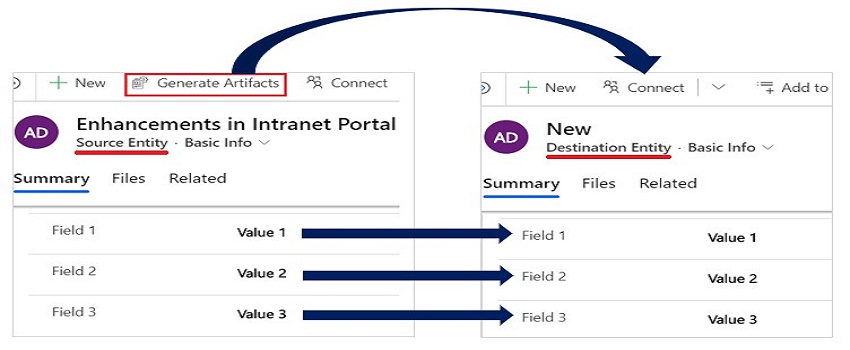
While using Dynamics 365 CRM, have you ever come across a situation where you are re-entering the same data on different locations or forms? If yes, then you are in the right place; let’s get your problem solved. In our blog, we will get you through the detailed process by which you can pass parameters & data from one form to another form using a single button click, with the addition of JavaScript on the ribbon workbench button’s command. Let’s look at a quick example of how you can do so. Follow the steps below: Open ribbon workbench. Select the solution that contains the source entity. 3. Add a new command of type Actions. Under that, add JavaScript Action. 4. Add a JavaScript action and call OpenDestinationEntityForm function, which is available in existing JS web resources 5.Now, add the ribbon button and fill in the necessary details. Also, link the command to the button. 6. Publish the changes. 7.Once done, navigate to the account and click the button to view the alert. Congratulations, you have successfully passed parameters from one form to another form using the ribbon button with customized ribbon workbench. If you are planning to customize Dynamics CRM or create custom workflows, business rules, plug-ins, ribbon workbench customization, etc., get in touch with our team of experts or add your comments below in case of query.